A simple messaging app for elderly parents: tap a face and talk
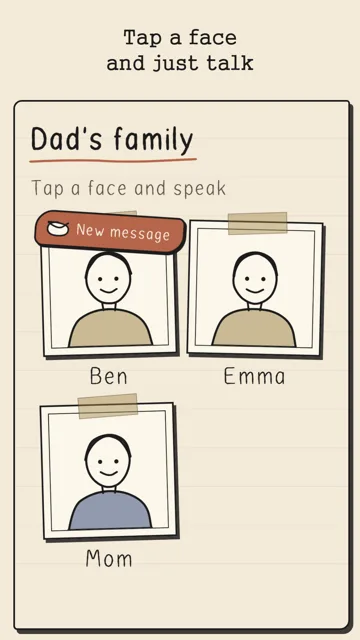
With DadTalk there is nothing to type. Your parent taps a family face and speaks, and the words are sent as a message. When a reply comes, the phone reads it out loud. A son made it for a father who can barely type a single letter.
Status: in Google Play review (submitted 2026-11-27). Android app. The download link will be added here on release day.
Hear it: how a message is read out
Edit the sender and the message, then press "Read it to me". Sound plays only when you press. Your device's own voice is used, so it may sound different from the app.
On your parent's phone
- The screen shows only the big faces of the family. A home screen widget holds 2, 4 or 8 faces.
- Tap a face and the phone says, "Go ahead, tell your son what you want to say."
- After your parent speaks, the phone reads back what it heard and asks, "Shall I send this?" "Yes" sends it; "no" lets them say it again.
- Messages are read aloud even when the app is closed. A message not yet heard is said again after 10 minutes, 30 minutes, 1 hour, then every 3 hours (quiet 10 pm to 7 am).
On your phone
- Choose which faces show big on your parent's screen, and upload the photos.
- Choose whether messages are read out right away, or announced first and read when the face is tapped.
- Send the home Wi-Fi name and password; your parent taps one big [Connect] button.
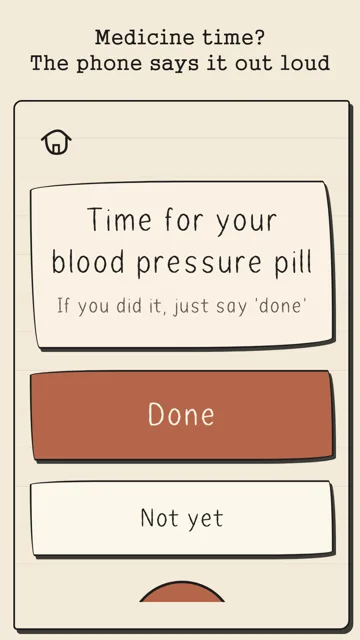
- Medicine and meal reminders: at the time you set, your parent's phone says it out loud. "Done" by voice or one big button comes back to you; no answer, and the phone asks again, then lets you know.
- On birthdays (lunar dates too), Christmas and New Year's Day, DadTalk suggests a few warm words.
How to start
- Install DadTalk on your own phone and create your family.
- Send your parent an invite link in a messaging app you both already use. Each link works once and expires after 24 hours.
- Your parent taps install, open and enter. You set the photos and settings from your phone.
Voice, messages and location
Speech is turned into text by the phone itself; DadTalk never records audio. Messages pass through our server (Cloudflare), which keeps the last 2,000 messages per family so a phone that was offline can catch up. A Wi-Fi password is deleted once your parent's phone saves it, or after 7 days.
Family location works only if the phone's owner turns it on. Only the latest location is kept, it is deleted when turned off, and the owner is told each time someone looks. (Privacy policy)
Why I made it
My mother developed dementia. I wanted to play together with her like we used to, so I made a play app called For Mom and gave it to her. After that, I felt sorry toward my father. My dad can barely type a single letter of a text message. So I made this talk app for him. I hope it helps other families talk more often too, whether it is Mom or Dad who finds texting hard.
From every son and daughter, to every father.
DadTalk
Tap-and-talk, messages read aloud, reminders that wait for an answer, and setup done from your own phone.
Android · First month free, then one monthly subscription by one child covers the family · No ads · In Google Play review (submitted 2026-11-27)
Questions
Can a parent who cannot type send messages?
Yes. In DadTalk your parent taps a family face and speaks. The phone reads back what it heard and asks "Shall I send this?"; saying "yes" or "send it", or tapping a button, sends it.
Who sets up my parent's phone?
You do, from your own phone: the faces and photos, how messages are read aloud, the home Wi-Fi, and a lock so settings can't be changed by accident.
How much does DadTalk cost?
The first month is free. After that, one monthly subscription paid by one child covers the whole family. There are no ads in the app.
Does DadTalk record my parent's voice?
No. Speech is turned into text by the phone itself; DadTalk never records audio. Everyone in the family installs DadTalk (Android) to message each other.